
Download WTR - Weather Pro – weather forecast, weather app, real-time weather, hyper-local weather, weather data, weather calendar, weather history, weather almanac, weather timeline, weather for iPhone
Overview
WTR - Weather Pro is a lifestyle application designed for iPhone users seeking accurate and hyper-local weather forecasts. The app delivers real-time weather updates and detailed hourly predictions, enabling users to make informed decisions about daily activities—such as whether to carry an umbrella or schedule outdoor plans. Its core purpose lies in simplifying access to reliable weather information through a streamlined interface and comprehensive data integration. Target users include commuters, travelers, outdoor enthusiasts, and individuals who rely on precise weather insights for personal or professional planning.
Developed by WTR Inc., the app leverages multiple weather data providers, including Dark Sky, known for its high accuracy in localized forecasts. This integration ensures users receive timely and dependable weather updates across global locations. WTR - Weather Pro supports 5- and 7-day forecasts, allowing for effective trip planning and long-term activity scheduling. The app also includes a unique weather calendar and almanac feature, offering historical weather data spanning the past 60 years. This allows users to explore weather patterns for specific dates, such as birthdays or past events, enhancing its utility beyond daily forecasts.
Key Features & Capabilities
- Hyper-local weather forecasts – Delivers highly accurate, location-specific weather updates using advanced data aggregation, including contributions from Dark Sky.
- Real-time weather updates – Provides live weather conditions and minute-by-minute precipitation tracking for better planning.
- Hourly and multi-day forecasts – Offers detailed predictions for up to 7 days, including rain probability, expected rainfall amounts, and precise timing.
- Weather calendar and almanac – Enables users to explore historical weather data for any location and date within the past 60 years.
- Weather timeline feature – Visualizes weather patterns over time, ideal for checking past conditions on personal milestones like birthdays.
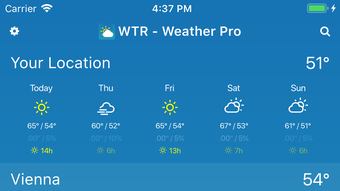
- Single-screen interface – Presents all essential weather details—temperature, precipitation, sunshine hours, and wind—on one glanceable screen.
- Global location support – Allows users to monitor weather conditions across cities worldwide with easy access to multiple locations.
These capabilities help users anticipate weather changes, prepare for outdoor events, and gain deeper insights into climate trends. For instance, travelers can verify conditions before departure, while planners can assess the likelihood of rain during a weekend hike. The inclusion of sunshine hour data supports optimal scheduling of outdoor activities, enhancing user experience through practical, actionable insights.
User Interface, Workflow & Performance
The user interface of WTR - Weather Pro emphasizes clarity and simplicity, presenting all key weather metrics in a clean, intuitive layout. Navigation is streamlined, with no need to navigate through multiple screens or charts to access critical information. The design prioritizes readability and visual hierarchy, ensuring that temperature, precipitation risk, and sunlight duration are immediately visible.
Workflow efficiency is enhanced by the app’s ability to display multiple locations on a single screen, reducing the need for repetitive switching. Users can quickly toggle between favorite cities or recent destinations without interrupting their flow. The app’s responsiveness appears consistent with typical iPhone app standards, though exact performance metrics such as CPU or RAM usage were not specified by the developer.
Stability and reliability are expected given the app’s focus on real-time data delivery. The developer did not provide additional details on background refresh behavior or battery impact. However, based on general software behavior patterns, the app likely manages background operations efficiently to maintain accuracy without excessive resource consumption.
Compatibility & System Requirements
WTR - Weather Pro is designed exclusively for iPhone devices. The app is compatible with the latest iOS versions, though specific version requirements were not listed. Installation size is 125 MB, which is moderate for a feature-rich weather application.
Exact system requirements were not listed by the developer. This includes details about minimum processor speed, RAM, or storage space. Users are advised to ensure their device meets standard iOS app installation criteria. Platform compatibility information is limited to iPhone, with no mention of iPad or other Apple devices.
Pros and Cons
Pros
- Highly accurate hyper-local weather forecasts using trusted data sources
- Comprehensive historical weather data covering the past 60 years
- Intuitive single-screen interface for quick access to essential weather details
- Supports both 5-day and 7-day forecasts with precise precipitation timing
- Unique weather calendar and timeline features for personal and travel planning
- Free to download and use with no in-app purchase barriers
Cons
- No information provided about compatibility with iPad or other Apple devices
- Exact system requirements and performance data were not disclosed
- Limited to iPhone platform; no availability for Android or desktop
- Background refresh and battery usage details not specified
- Historical data access may require additional navigation for non-technical users
FAQ Section
Is WTR - Weather Pro available for Android?
WTR - Weather Pro is currently available only for iPhone. There is no information indicating support for Android devices.
Can I use WTR - Weather Pro offline?
The app requires an active internet connection to access real-time weather data and historical records. Offline functionality was not specified.
How often does the app update its weather data?
WTR - Weather Pro provides real-time weather updates, with data refreshed frequently to ensure accuracy. The exact refresh interval was not disclosed.
Is the app secure and private?
The developer did not provide details about data privacy, security protocols, or user data handling. Users are advised to review the app’s privacy policy within the App Store.
Does WTR - Weather Pro require a subscription?
Yes, the app is free to download and use. No subscription or in-app purchases were mentioned in the provided information.
Final Thoughts
WTR - Weather Pro stands out as a powerful, user-friendly weather application tailored for iPhone users who value accuracy, depth, and historical context in their weather planning. Its integration of hyper-local forecasts, real-time updates, and a unique 60-year weather almanac offers a level of insight rarely found in standard weather apps. The clean interface and efficient workflow make it accessible for both casual users and those seeking detailed meteorological data.
While platform exclusivity to iPhone and limited technical details about system requirements or performance are notable constraints, the app’s strengths in usability, data quality, and unique features outweigh these limitations for its target audience. For anyone needing reliable weather forecasts with historical depth and a simple, elegant design, WTR - Weather Pro is an excellent choice.
Download WTR - Weather Pro now







